Build a Database-Backed Todo List
todo_list is the smallest dynamic Pharos app in the shipped set that still uses a real database. There are no users, no auth routes, and no client-side state layer. You add and remove cards and the board redraws from committed SQLite state.
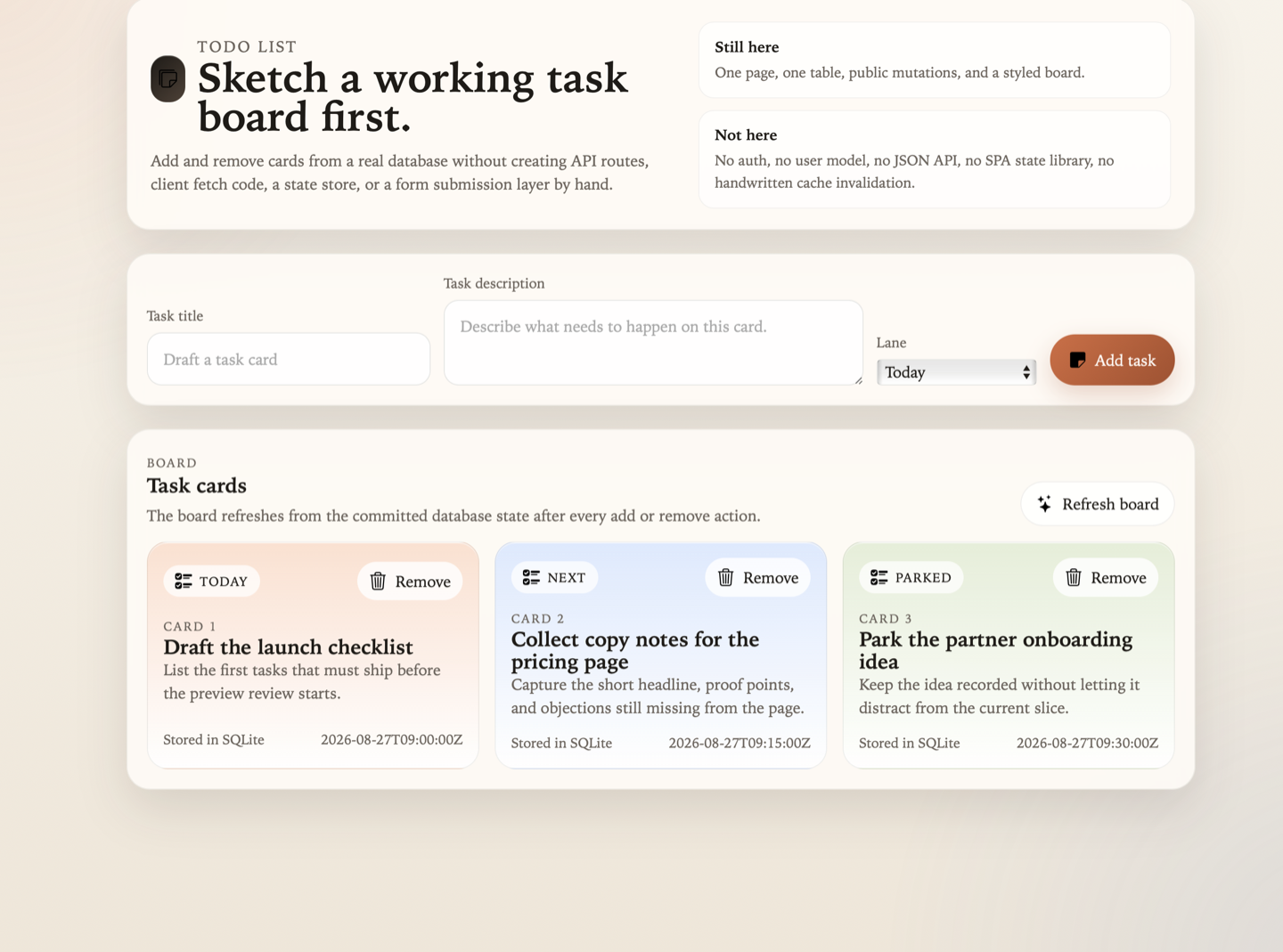
The whole app fits on one screen: page shell, one mutation form, and one board refreshed from committed SQLite state.
- Plain HTML form: fastest way to see the Pharos boundary in one screen.
- Board reads committed rows: the app owns UI and rules.
- No auth or client store: the framework owns routing, validation, transaction handling, and refresh.
Run it
The Debian package already installs the built Todo List artifact under /srv/pharos/apps/todo_list. You do not need to build it again.
Start the installed runtime:
sudo systemctl start pharos
Open http://127.0.0.1:7323/todo-list/.
Then:
- Add a task card.
- Add a short description under the title.
- Change the lane between
Today,Next, andParked. - Remove a card.
The installed app stays under /srv/pharos/apps/todo_list.
Open these files next
Once the app is running, read the source in this order:
pharos.app.yml → home.page.yml → home.body.html → routes.yml → tasks.yml → data/migrations/sqlite/
Concretely:
./todo_list/pharos.app.yml./todo_list/templates/home.page.yml./todo_list/templates/home.body.html./todo_list/data/contracts/routes.yml./todo_list/data/features/tasks.yml./todo_list/data/migrations/sqlite/
That path shows the full loop from app identity to page structure to action behavior to the SQLite shape underneath it.
Create an editable copy
When you are ready to change the app itself, copy the packaged example source into a writable local app root:
cp -R /usr/share/pharos/examples/todo_list ./todo_list
On macOS, copy from /usr/local/share/pharos/examples/todo_list instead.
Build and run your editable copy:
sudo pharos build app todo_list --app-dir ./todo_list --build-dir /srv/pharos
pharos migrate apply app todo_list --app-dir ./todo_list --backend sqlite
sudo systemctl restart pharos
Open http://127.0.0.1:7323/todo-list/.
Your working source remains in ./todo_list/, the built artifact is refreshed under /srv/pharos/apps/todo_list/, while SQLite data and runtime state stay under /var/lib/pharos/ and /var/state/pharos/.
Make your first Todo List change
Open:
./todo_list/static/css/site.css
Change the accent colors at the top of the file:
:root {
  --accent: #2f7cf7;
  --accent-deep: #1d4fc4;
}
You can also change the board headline in:
./todo_list/templates/home.body.html
Rebuild the app and reload the shared runtime:
sudo pharos build app todo_list --app-dir ./todo_list --build-dir /srv/pharos
pharos migrate apply app todo_list --app-dir ./todo_list --backend sqlite
sudo systemctl restart pharos
Refresh the board. Your local SQLite data remains in /var/lib/pharos/todo_list.sqlite3.
Contract and runtime flow
In many frameworks, a small todo SPA still grows a stack around itself:
POST /api/items           handwritten mutation route
GET /api/items            handwritten query route
fetch or axios            browser transport code
component state store     client copy of server state
loading and error flags   manual UI orchestration
cache invalidation        manual refresh after mutation
router refresh            explicit page or region reload
In Pharos, the add flow stays narrow:
HTML form → declared action → validated input → SQLite transaction → fresh board fragment
The form is still ordinary HTML:
<form class="composer-form" pharos-action="add_item" pharos-target="board-panel">
  <input name="title" maxlength="80" required>
  <textarea name="description" maxlength="220" required></textarea>
  <select name="lane">
    <option value="today">Today</option>
    <option value="next">Next</option>
    <option value="parked">Parked</option>
  </select>
  <button class="button-primary" type="submit">Add task</button>
</form>
The action is declared once in ./todo_list/data/features/tasks.yml:
actions:
  add_item:
    path: /items
    method: POST
    policy: public
    input:
      title: {type: string, required: true, min_length: 1, max_length: 80}
      description: {type: string, required: true, min_length: 1, max_length: 220}
      lane: {type: enum, required: true, values: [today, next, parked]}
    transaction:
      insert:
        entity: todo_item
        values:
          title: input.title
          description: input.description
          lane: input.lane
          created_at: server.now
    response:
      render: todo_board
      target: board-panel
      queries: [todo_items]
      fallback: {redirect: /}
Pharos validates the input, writes the row, reruns the authoritative query, and returns the updated board fragment. There is no app-authored JSON endpoint, browser fetch, or client store to keep in sync.
Make one contract change
After the visual CSS change, make one small contract change so the behavior shift is obvious.
In ./todo_list/data/features/tasks.yml, add a fourth lane value:
lane: {type: enum, required: true, values: [today, next, parked, later]}
Then update ./todo_list/templates/home.body.html so the new lane appears in the selector and the rendered board.
Rebuild and reload:
sudo pharos build app todo_list --app-dir ./todo_list --build-dir /srv/pharos
pharos migrate apply app todo_list --app-dir ./todo_list --backend sqlite
sudo systemctl restart pharos
That one change makes the ownership boundary concrete:
- the app owns the product rule and presentation
- Pharos still owns the route handling, input validation, transaction, and fragment refresh
App-owned and framework-owned surfaces
- Your app owns the cards, lanes, templates, CSS, and task rules.
- Pharos owns request routing, CSRF handling, input bounds, parameterized database writes, fragment refresh, and no-JavaScript fallback behavior.
Next
Move to the Beacon Beats audio store to add relational dependencies such as accounts, carts, checkout, protected downloads, and owner reporting. After that, use UCAL for a larger app with users, roles, email, and scheduling workflows.