Build a Scheduling and Workflow App
UCAL is the larger workflow app in the tutorial path.
It keeps the same Pharos authoring model while adding users, roles, scheduling, email, business administration, customer views, and broader workflow state.
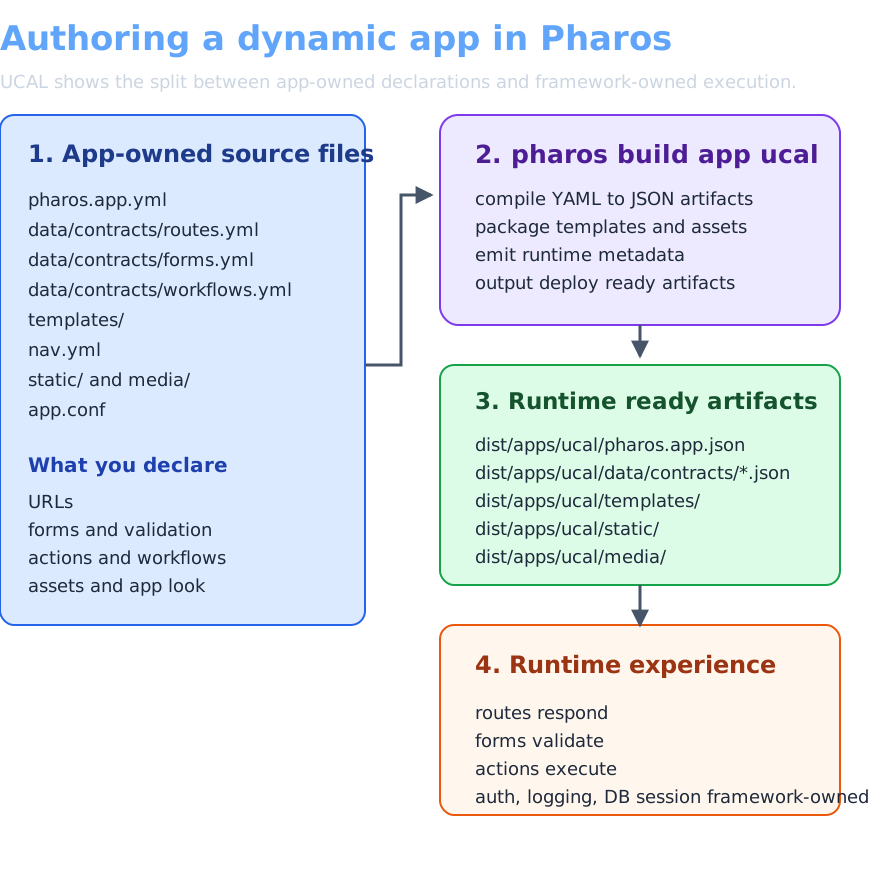
Unlike todo_list and commerce_spa, UCAL is not part of the base packaged app set. Download the versioned UCAL archive from the release page, extract it into a writable directory, and run it from there.
Download the UCAL archive
Download the versioned UCAL archive from the Pharos release page.
Extract it, then cd into the extracted ucal/ app root before running the commands below.
Run it
If you already installed the Debian package, place UCAL into the same shared runtime path as the other apps:
sudo pharos build app ucal --app-dir . --build-dir /srv/pharos
pharos migrate apply app ucal --app-dir . --backend sqlite
pharos seed app ucal --app-dir . --backend sqlite
sudo systemctl restart pharos
Open http://127.0.0.1:7323/ucal/, then:
- Sign in as business owner
owner1with passwordsecret. - Review the scheduling views and the authenticated workflow screens.
- Sign out and sign in as customer
customer1with passwordsecret. - Compare the customer-facing flow with the owner-facing flow.
Your writable app root remains in the extracted ucal/ directory. The built artifact is refreshed under /srv/pharos/apps/ucal/.
Open these files first
Read UCAL in this order:
./pharos.app.yml./data/contracts/routes.yml./data/contracts/actions.yml./data/contracts/workflows.yml./data/contracts/integrations.yml./templates/./data/schema/sqlite/
That order follows the app from runtime shape to route map to action behavior to workflow effects to integrations to UI to relational storage.
Keep the running app open while reading. Start with the owner flow and the customer flow, then map the screens back to routes, actions, workflows, and templates in that same order.
One request path in full
UCAL becomes easier to read once you stay on one concrete path instead of skimming the entire app at once.
For one clean pass, follow:
- the business or customer page route in
./data/contracts/routes.yml - the matching action in
./data/contracts/actions.yml - any workflow step it triggers in
./data/contracts/workflows.yml - the template that renders the updated screen
That keeps one complete learning path for the app in front of you instead of splitting the same app across repeated topics.
App and framework boundary
The app owns the business rules, route inventory, workflow shape, templates, copy, and scheduling decisions.
Pharos owns request handling, validated input, CSRF, sessions, policy gates, parameterized database work, fragment updates, and runtime behavior.
One contract example
Open ./data/contracts/routes.yml and ./data/contracts/actions.yml side by side, then compare one owner-facing or customer-facing POST route with the rendered result in the running app.
Pick one flow, watch where the route points, then follow the action and the rendered template.
Make your first UCAL change
Open:
./static/css/style.css
Change one of the brand colors or spacing tokens near the top of the file.
Then make one behavior change in app-owned contracts:
- open
./data/contracts/actions.ymlor./data/contracts/workflows.yml - change one owner-facing or customer-facing label or workflow explanation
- rebuild and confirm the changed wording in the running app
You can also change the landing copy or dashboard copy in the app-owned templates under:
./templates/
Rebuild, reseed, and reload the same app root:
sudo pharos build app ucal --app-dir . --build-dir /srv/pharos
pharos migrate apply app ucal --app-dir . --backend sqlite
pharos seed app ucal --app-dir . --backend sqlite
sudo systemctl restart pharos
Refresh the app. UCAL data remains under /var/lib/pharos/ and /var/state/pharos/.
Keep the owner view or customer view open while you change the source so the file order and the rendered app stay connected.
What the framework is handling
Adding roles, bookings, email, and owner-versus-customer flows in a conventional stack usually means:
separate admin area         duplicated application surface
role middleware per route   repeated authorization wiring
form handlers everywhere    repeated request and validation plumbing
scheduling endpoints        custom query and mutation transport
workflow pages              one-off screens for each business state
email glue                  extra integration code around domain events
In UCAL, the app still works through the same declarative surfaces:
- routes describe which pages and actions exist
- policies describe who can do what
- entities and features describe the data and transactions
- templates describe the app-owned interface
UCAL stays on the same authoring model as the smaller apps. The difference is scale, not a separate stack.
Next
Continue into Why Pharos changes the app boundary, then use Fixture and Surface List when you want the broader surface inventory.